|
|
What We Offer: End User Training/Support | Performance Toolkits | Blended Learning |
|
Welcome to QuickSuccess for SalesForce.comOn this page you will find:
What is the QuickSuccess Toolbar? The Toolbar is a means of access to context-relevant performance support created with the ActiveGuide Studio, by Rocket Software. The support listed under each button changes as the you progress through an application, process or website. Click on a button to open a drop down list of current links. Click on a link to launch the fully-interactive support that mediates between you and the application. It guides you to the successful completion of real work in real time in live applications thereby reducing or eliminating the need for off line application training. After all, your job is to complete tasks, not learn applications. How to use the QuickSuccess Toolbar: For best results we recommend that you follow these steps:
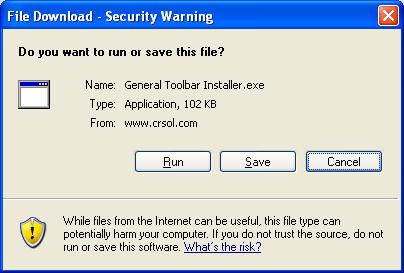
Installation Instructions for the Toolbar:
Uninstall Instructions:
Troubleshooting: If the new Toolbar does not appear follow these steps:
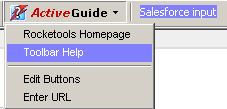
Access Toolbar Help from the Toolbars' ActiveGuide button
Fine Tune IE To Work With The Toolbar: Pop Up Blockers! Most pop up blockers will not interfere with ActiveGuide's operation but should the support fail to run in your browser when you click on a link it's probably because of a pop up blocker. You can easily solve this. Hold down your CTRL key and click the support link again and continue to hold CTRL down until you see that the support is running. You can then release it. IE Secure/Nonsecure Message If you're receiving the message "This page contains both secure and nonsecure items" when running content from the ActiveGuide toolbar (and during web browsing) you can either click on "Yes" or press your "Enter" key each time this appears or, reset your browser to allow mixed content to display without the popup message by doing the following:
Does this put me at Risk? While this does not increase your risk from exposure to viruses, at any time you can easily reset it to "Prompt" via the same procedure. IE Active Content Message If you are using Windows XP you may see this
message attached to the IE toolbar (possibly accompanied by a pop up
message to look at your Information Bar): For ActiveGuide content to run it must temporarily place a file in your computer's cache (as does every graphic on every web page) which disappears after it has run. IE on XP attempts to screen out harmful files and in the process often blocks simple JavaScript from running (JavaScript is common on many sites). If you get this message you can change your IE settings to allow the Toolbar content to run:
Does this put me at risk? This change will only allow the temporary caching of content that will then run on the pages in your browser. It does not put you at risk of installing pernicious software as windows will still not allow files to be permanently downloaded and/or installed without your explicit permission (you will be prompted to give permission).
|
|